Archive for the ‘tools’ Category

What’s In Your Social Media Toolkit?

What's your social media toolkit?You can think of social media as a set of tools that organizations can use for a variety of purposes – customer service, branding, promotion, relationship-management, etc. Just as with any toolkit, you’re not going to use every tool every time.

Sometimes the hammer fits, but if you’re trying to measure something the hammer is pretty much useless. Similarly, sometimes a blog will fit perfectly, while other times YouTube might be a more suitable tool. Sometimes (say it ain’t so!) social media outreach won’t fit at all.

If social media represents a set of tools – what’s in your toolkit?

Over the last two years my online toolkit has shifted back and forth as tools have come and gone. Recently, however, I’ve noticed a bit more stability in the services I use. Is this a reflection of a slightly maturing marketplace? Or just of a tough economy?

Here’s my current toolkit. I use these tools pretty much every day:

What’s in your toolkit? What’s changed from a year ago?

Don’t Like What You See? Fix It

Over the last little while I’ve seen numerous people complaining about how some social media tools are becoming “too mainstream” for their liking. For them, as more and more people join services like Facebook and Twitter, they lose their relevance and usefulness.

My response: Social media tools are opt-in, so if you don’t like what you see, fix it.

Recently, I mentioned that I wasn’t a fan of the high volume of automated Alltop tweets in Guy Kawasaki’s Twitter stream… so I don’t follow him. It’s nothing personal; just me controlling what I want to see in my stream. You can apply a similar principle across your social media toolkit. You don’t need to bail completely out of using these tools just because of the way people are using them.

  • If you don’t like the large number of new people signing up for Twitter, don’t follow them.
  • If your Twitter stream is too populated for your liking, cull it.
  • If you don’t want to connect to that long-lost high-school boyfriend/girlfriend on Facebook, don’t.
  • If someone’s blog has shifted focus and you no longer like it, don’t subscribe.

This doesn’t mean that you shouldn’t give feedback to others, or that other people should disregard that feedback. That’s still important.

It does mean that you have the power to control your online experience… so quit complaining and do it.

MicroPlaza – Your Personal Micro-News Service

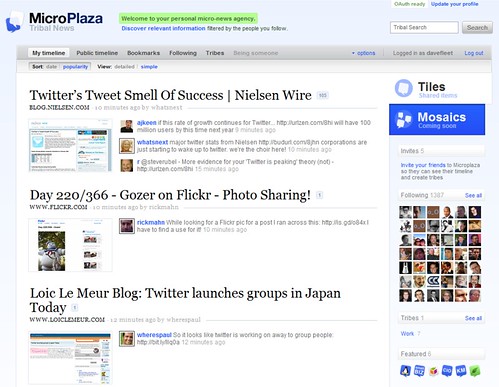
Over the last couple of days, I’ve spent some timechecking out MicroPlaza, the latest in a long line of services that have sprung up around Twitter. The difference between this one and most of the others?

This one is useful.

Summary

MicroPlaza aggregates all of the links tweeted by the people you follow. Every time one of your friends posts a link on Twitter, MicroPlaza records the message, along with the tweets of other people who have posted that same link. 

You can sort the links by date or by popularity (the number of people who have tweeted that link). You can also bookmark links and retweet your favourites from within the site.

Organizing

This could all be a little much – if you follow lots of people the number of links could get overwhelming – but MicroPlaza also lets you create “tribes” – groups of your followers whose links you can view separately.

Now, I’m not really interested in new high-maintenance services – especially those that are built on top of other high-maintenance services. This makes it especially useful to be able to subscribe to both your full feed AND your tribes via RSS. 

Practical uses

How might MicroPlaza be useful?

  • Read what your friends read – create a ‘tribe’ of your friends and subscribe to that tribe.
  • Keep up with your workmates – create a ‘tribe’ with your colleagues.
  • Research – create a ‘tribe’ of experts in a chosen area and learn from them.
  • Stay on the leading edge – create a ‘tribe’ of people who are on the cutting edge of whatever topic you like.
  • Competitive intelligence – follow your competitors, create a ‘tribe’ with their accounts, and see what they’re reading.

See how useful this could be?

(Thanks to Danny Brown for the invite to check this out.)

Q&A With Marcel Lebrun – Part One: Radian6′s New Features

Earlier this week I posted an analysis of new features that Radian6, a social media monitoring company, released over the last weekend. That same day Marcel Lebrun, CEO of Radian6, left a very lengthy but equally helpful comment on my post.

As a follow-up to that post, I had a chance to ask Marcel a few questions about the new features about Radian6 in general and about their plans on the future. The interview was quite long, so I’m splitting it into two posts.

Today: looking at Radian6′s new features.

Q: You released a lot of new features last weekend. They affect a lot of different areas of Radian6; which ones are you most excited about?

A: All of it!!  There are so many new things we can do with this platform now.   I am most excited about the power of these new features when used in combination to help companies (and their agencies) collaborate & scale their listening & engagement.   It really enables a company to effectively setup their “listening grid” in a way that can engage many parts of the company and facilitate easy collaboration amongst employees (and their consultants, agency partners, etc.). 

A lot of practical testing went into how we integrated workflow (conversation sidebar) into as-it-happens emails & IM and then how we enable this data to be sliced & diced in the dashboard.    

Even for a small company like us, we have become so dependent on this tool to coordinate & manage our own listening & engagement that we know it will be a hit.  Without it we would likely need 2-3 more headcount and I know we would have coordination issues (multiple people responding, stuff falling through the cracks, wasted/duplicated effort, lack of measurement, etc.).

Q: Your new “conversation sidebar” significantly enhances the workflow functionality within Radian6. Do you have any plans to enhance that further?

A: Yes, the conversation sidebar enhances workflow, and it also significantly enhances the ability to have internal conversations & collaboration around listening & engagement.  It enables what I like to call a “purpose driven” social network inside your company or between agency/client (the purpose being listening & engaging with customers). 

In terms of further enhancements, we are really looking to see what feedback we get from our customers on the sidebar and we will keep making it better.

Q: Any plans to extend IM functionality to Live Messenger?

A: Yes, we are looking into adding Live Messenger support as well.

Q: How do you see people using source tagging [a new feature] most effectively?

A: Source tagging is extremely powerful.  I like to think of it like the “calling line ID” of the social web.  Let’s say you see a mention of your brand, and one employee tags this person with “national account” and “customer ID#1234”.  In the future, every time this customer talks about you online, the content will carry these tags so that the information is available to everyone in your organization.  This saves effort and provides for smarter engagement.  Not only that, but you can setup different listening alerts tied to the tags. 

In this example, someone in the company could setup an alert to listen only to conversations/mentions from “national accounts”.   In the future we will be adding rules based on source tags (and we have the start of that today with tag based alerting).

Another powerful use of source tags is segmentation & measurement.  Imagine being able to understand the conversation pattern of only the particular customers who bought your new product?  How many of these existing customers first asked their network about your product prior to buying?  How long before the purchase and which ones did you engage with directly (versus others)?  

Use source tags in combination with our new segmenting features and you can segment by tag, then sub-segment by engagement type and quickly get answers to these questions.  

We have a post up (yesterday) which talks a bit more about source tags: http://www.radian6.com/blog/141/source-tagging-the-caller-id-of-the-social-web

As an example, I added the tag “Thornley Fallis” for you [Dave: Marcel added this tag to his search for posts mentioning Radian6].  So here is a chart I generated where I picked March 2, filtered for your tag only and then segmenting by media type.  I can quickly see that you had 1 post, 2 tweets and 11 comments on topic (we count both comments and trackbacks since they appear on your blog). 

Overall we had 125 Radian6 mentions on March 2 and you generated 11% of that.  I also know that about 32% of the mentions came from current customers and 52% from people who are not yet customers – interesting.  I can now easily analyze the conversations from customers vs non customers to see patterns.

Thanks to Marcel for taking the time to share his thoughts. 

Check back in tomorrow for the second half of the interview, in which Marcel speaks about trends in social media monitoring, tells us where he sees Radian6 in the marketplace, and gives us a sneak preview of an upcoming feature.

Test-Driving The New Radian6 Features

Radian6 really got its groove on this weekend, with a whole raft of new changes that close the gap with its competition in some areas and set it ahead in others. I’d had a heads-up that some of them were on the way, but this weekend was the first time I’d had a chance to play around with them. 

 I use Radian6 pretty much daily and have fed a number of thoughts back to the team there, so I was excited to see the announcement of this latest round of changes. Here are the major changes from this release, along with my take on them.

Real-time notifications

One of my big peeves with Radian6 has always been that you could only get notifications of new search results once per day. In a constantly-evolving online environment, once per day simply doesn’t cut it.

With the new enhancements, this issue is removed; replaced by near real-time emails and/or IMs – available through the “configuration” tab. The IM function isn’t compatible with Live Messenger so isn’t much use to me unfortunately (we use MSN at work), but is a nice addition.

This new functionality is only available for new topic alerts, which may be a little irritating, but it’s more than worth taking the time to re-create your alerts so you can be notified more frequently about new posts.

For an example of how effective the new alerts are, about an hour after posting the images from this post to Flickr I received a message from Marcel Lebrun, CEO of Radian6, whose alerts had picked-up my images and who smelled a blog post in the works. Marcel also pointed out another neat feature of these “as-it-happens” alerts:

“When you click on a tweet via As-it-happens alerts, you get to see [a] special page with tweet, bio, recent tweets to/from and can engage.”

I’d missed this until that point – you can now log-in to your Twitter account from the conversation sidebar (see below) and engage with people from there.

“Conversation sidebar”

A little while back Radian6 added workflow features to their service – the ability to assign posts to others, allocate a status and classify posts, and add notes and tags. Very useful, but a little clunky.

With the introduction of the conversation sidebar, Radian6 has taken its first steps towards a workflow system that I can see us using.

The conversation sidebar appears on the left of your browser when you click a link in a notification email, an IM message or your “river of news” widget, while the post you’ve selected appears on the right. From this sidebar you can assign posts to other members of your team, identify your engagement with the post and any future action, assign sentiment and classify the conversation (leads, complaints, compliments, etc).

The “Add to the Conversation” field is a little misleading – the field simply adds a ‘note’ to the post in Radian6. With a title like that, I would expect it to post a comment to the post in question.

This is a significant addition to the Radian6 workflow which, despite its clear usefulness for groups, has been underused so far in my view. The next piece to this particular puzzle is real-time emails when you assign a post to someone, so they don’t have to continually log-in to Radian6 to find their newly-assigned posts. 

As the announcement to customers stated, “The Conversation Sidebar will help enterprise teams scale their engagement, coordinate their community outreach, and track and analyze their external conversations.”

Source Tags

You can now tag not only posts, but also sources. I can see this being useful for categorizing sources, flagging that you’ve previously responded to them, noting where they’re from etc.

The source tagging option is available from the workflow in the “river of news,” and from the conversation sidebar (you can see it in the image above). However, this option does not seem to be available for forums, which seems odd. Not sure why that is – while you might not want to tag things as specifically, it would still be useful.

Comments

This is a big deal for me: the addition of comments to Radian6′s coverage. This was a big gap between Radian6 and its competitors previously, and a big time suck for those of us monitoring online. Pulling blog comments into Radian6, while still allowing the option to exclude them from volume analyses, is very powerful.

Why does it matter so much? As I outlined in my PodCamp Toronto presentation recently, let’s say a car enthusiast writes about GM‘s latest car. If you were Scott Monty at Ford (note: this is hypothetical – I have no idea whether Ford uses Radian6 or not), that would likely not show up in your search results. If, however,  the comments took a swerve and the conversation focus switched to Ford’s latest offering, that still wouldn’t have shown up… until now, anyway. Now that comments are indexed, the comments referencing Ford would now show up in Scott’s dashboard, and he could decide whether or not to engage.

Interestingly enough, the comment indexing is provided by BackType, about which I’ve written in the past. Christopher Golda of BackType was actually in the crowd during the presentation I mentioned above.

One important point: if your profile is close to the boundary between different pricing levels, note that the addition of comments will drive up your montly search volumes and have a knock-on effect on pricing.

New metrics

The new rollout gives Radian6 users a couple of new metrics to use when looking at influence.

While users have always been able to see the number of “on-topic” inbound links (though how they decide what is “on topic” is beyond me) to posts in their search results. The new release adds the total number of inbound links (according to Google) to the analysis widgets. Very handy, and very easy to spot.

The other new metric is perhaps more useful as it’s the first thing, beyond forum views, to track traffic numbers in Radian6. The new release adds Compete.com website traffic statistics into the influencer widget.

However, there are a couple of “buts” here. The first is that this data isn’t free – it runs to $50 per month, per topic profile. The other “but” is that, as with many services, Compete is great but for sites with smaller traffic volumes (like mine), you get “rough estimates.” It also focuses on US visitors. Still, Compete is the leader in this kind of analysis, so this is another step in the right direction.

Content segmentation and analysis

You can now segment your analytics even more effectively, with break-downs available on:

  • Language
  • Region
  • Media type
  • Engagement level
  • Source tag
  • Post tag 

The biggest develop in this segmentation for me, though, is the ability to segment by sentiment.

While, in the past, you could allocate sentiment to posts, until now you couldn’t graph it so it was essentially useless. I’m a little disappointed to only see positive/neutral/negative as options and not the nuances (the “somewhat positive” and “somewhat negative” posts are grouped as “other”) but, again, it’s a good step in the right direction.

You can also sort your analysis widgets by numerous metrics:

  •     Number of posts
  •     Comment count
  •     View count
  •     Vote count
  •     Twitter followers
  •     On-topic inbound links
  •     Total inbound links
  •     Number of unique sources

As the announcement notes, “Want to know which keywords or topics generate the most commenting activity? Which blog post generated the most Twitter impressions? Now you can see the buzz around your topics at a glance.”

Conclusion

This is an excellent set of new features for Radian6. I have quibbles with a few things here and there, and the workflow in particular is a work in progress, but the product is ever-evolving and this is a strong release that adds significantly to Radian6′s usefulness.

The most important features, in order of importance (from my perspective):

  • The addition of comments;
  • Real-time alerts;
  • Graphing sentiment;
  • Workflow improvement via the conversation sidebar (would be higher with the addition of email alerts).

Reality Check on Twitter

Twitter is everywhere right now. It’s in the news; it’s all over the blogosphere; it’s the latest celebrity toy. I know I’m a big fan of it, and I certainly write about it a lot.

On the flip side, despite exponential grown in recent months, only a tiny proportion of people use Twitter. Yet every day I see more and more “experts” whose experience is limited to getting Twitter followers. So, here’s a bit of a reality check on Twitter.

Twitter is not:

  • Essential to every company’s success, or right for every company;
  • Mandatory for every company out there (remember PR 101? Audience targeting?);
  • The first thing you should do online;
  • Going to turn around your bad business model;
  • Going to fix your shoddy product;
  • A silver bullet for your customer service issues;
  • Used or read by the majority (just ~6 million in total… consider there are 300+ over 500 million (thanks Tamera) people in North America alone);
  • A replacement for other communications/social media tactics (think AND, not OR);
  • A staple requirement in every communications strategy;
  • The same thing to everyone.

It’s a tool. For some it’s an critical tool. For some it’s a useful tool. For some it’s the wrong tool.

Think carefully before getting involved. Think even more carefully before taking generic advice and applying it to your unique business.

Plan your activities strategically. If Twitter, or blogging, or other online tools are right for you then great. Listen, engage or develop your own places. If particular tools aren’t right for your business, don’t use them. Just remember: don’t let fear drive that decision – let your target customers.

</rant>

Be Careful What You Save

Be careful what you save in Delicious.

To be a little more specific – be careful how you save things in Delicious.

*Social* bookmarking

Delicious is a social bookmarking tool. This  means that, while Delicious is great for replacing your bloated “favourites” list in your browser, there are also sharing features built-in. This is helpful for teams working in the online space – you can easily tag something as “for: [someone]” to send it to them – but it also brings with it a few other considerations.

Network with care

One of my favourite features in Delicious is the ability to form a network of contacts (here’s mine). When you add people to your network, you can easily subscribe to all of their bookmarks in an RSS reader (I’ve mentioned this before when looking at 6 ways to make your life easier with Delicious). Pretty neat, huh?

Delicious network

Unless you don’t want other people to see the things you’re bookmarking, that is. Maybe you’re working on a new business project, or trying to do something to surprise someone, or *gasp* bookmarking job postings.

Now, Delicious has a “Do not share” feature that prevents others from seeing the sites you save. Problem solved, you would think. But what if you forget to check the “do not share” box when you save the article? No problem, surely – you can just go back and click it later, right?

Wrong.

Yes, you can go back and un-share your bookmarks. Yes, that will remove that bookmark from the public list of sites you’ve saved.

No, it won’t remove them from RSS feeds.

An example

I recently had a conversation with someone about using Delicious to save research they were conducting. We discussed the importance of making their bookmarks private.

Imagine my surprise, then, when I glanced at my RSS reader a while later and saw numerous bookmarks from that person on the topic we’d just discussed. When I searched the person’s saved bookmarks on Delicious itself they were gone – they’d obviously corrected the error – but they’re now stored forever in my Google Reader results.

Once again, a useful reminder – be careful what you do online.

ReviewMyWeb: Free SEO Competitiveness Tool

ReviewMyWebAlmost a year ago, I took a spin through HubSpot’s Website Grader – a free online tool that rates your website against a whole raft of search engine optimization (SEO)-related factors. Since then, it has stood as one of the better free tools around for analyzing your website.

The other day I received an email from Sam Babal asking me to take a look at his new tool, ReviewMyWeb. I have to say, I’m quite impressed.

ReviewMyWeb lets you plug in your website’s URL, along with up to two others, and emails you a report looking at factors including traffic, backlinks, metadata and keyword data, and indexed pages.

To give the tool a test run, I plugged-in my site along with two other popular Canadian PR blogs, Joseph Thornley’s ProPR and Dave Jones’ PR Works. I won’t run through all of the results in general here, but I will focus on a few that are worth mentioning.

Overall Results

ReviewMyWeb Competitiveness Rating


The first thing ReviewMyWeb does is give you a big-picture assessment of how your site is doing. In my case, I’m losing-out on backlinks and blog coverage (aka number of indexed pages). Neither of these surprise me – those two guys have been blogging for way longer than me so that’s understandable. It’s also handy – you can see at a glance how you’re doing and where you’re falling down.

Traffic Comparison

ReviewMyWeb Traffic Rank Comparison

The traffic rank comparison is one area that I found confusing until I got my head around it. It seems that lower scores are better, but no-where does it explain that to you. I’m guessing the site uses Alexa Rankings to generate its traffic report, which would generate the screwy ‘high is bad’ numbers. The graph, though, flips things around again – high is once again good. An explanation of the meanings of these two metrics would be helpful.

Inbound Links

ReviewMyWeb Backlinks Comparison

Backlinks is one of the two areas where I’m getting toasted according to this analysis, so it’s worth examining. The difference in the three search engines used is very interesting – for one thing, Yahoo finds more than 10 times as many links as Google does, while Ask.com puts my site way out in front. As with most things online nowadays though, “in Google we trust,” right?

Indexed Pages

ReviewMyWeb Coverage Comparison

The interesting thing to note here is that, once again, each of the search engines is showing drastically different results (although I have the same number of pages according to Google and Yahoo!). It really does raise the question, which one should you trust?

Final Analysis

There are plenty of other metrics there in graphical format; the final analysis, though, is the most useful part of a ReviewMyWeb report. This section summarizes your strengths and weaknesses, and provides pointers towards improving each of them.

According to this analysis, ReviewMyWeb Summary:

  • This site ranks above the others under Google’s PageRank formula;
  • I’m slightly underperforming the others in terms of backlinks;
  • I’m outperforming the other sites in terms of indexed pages;
  • My site uses keywords well within its code;
  • I’m generating “less buzz in various web communities” in comparison to the other sites.

Conclusion

Overall, ReviewMyWeb is a useful tool, and it can help to shine a light on where you’re doing well and where you aren’t. Unfortunately, though, it is let down at the moment by two flaws:

  • Lack of explanation of how some of the metrics are calculated (traffic and web community buzz being good examples – it doesn’t name these communities).
  • Lack of real, practical tips for improving on your weaknesses.

The main difference between Website Grader and ReviewMyWeb is its practical focus. HubSpot‘s tool digs deep on the content on your site, and gives some useful recommendations. ReviewMyWeb simply tells you to get more links from other sites (for example). Still, ReviewMyWeb has the edge I like being able to benchmark myself against similar sites, I find the tool easy to use and,

Despite the points I’ve highlighted here, I do find this to be a useful tool. There’s room for improvement but ReviewMyWeb is still worth checking out. Let’s face it, the price is right.

Take a look and let me know, what do you think? Useful? Not? What could be improved?

Do You Get Social Tool Fatigue?

A few weeks ago, Forrester Research analyst Jeremiah Owyang announced that he was taking a 20 day hiatus from Twitter. This Tuesday, CIO Magazine’s C.G. Lynch described how, while social media tools may have improved his writing, he needed to turn them off in order to actually write:

“Without those tools, I might have not had the same experts and colleagues at my disposal who offer me some of the best insights on technology, media, journalism and life — all things that make me a productive and (I hope) intellectually curious individual.

But to do the basic thing that sustains me (write), I had to block it all out.”

Yesterday, Jennifer Leggio noted that “FriendFeed is a little high maintenance — you need to really have time to manage that community to get the most out of it.”

I know I’ve found some of these social media tools overwhelming at times, especially when I’ve been particularly busy at work. Even though I’ve reduced my Twitter useage since starting to work on the agency side (see below), it can still be too much somtimes. I still find I’ll have days when I just need to close TwitterGoogle Reader, Facebook and the other apps, and just focus. However, sometimes it feels like there’s a pressure there to keep up the flow.

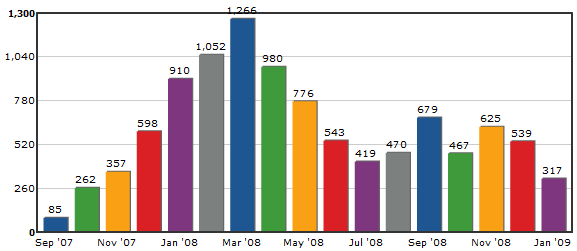
Tweetstats graph for davefleet

My question to you: do you get social tool fatigue? How do you deal with it? Do you find it easy to switch off when you have to?

Present.ly – Internal Microblogging Just Got Better

Present.lyLast September I wrote about Yammer, a Twitter-like “microblogging” service designed for internal use by organizations. At the time I decided I liked it, describing it as “Twitter behind the firewall… and turbocharged.”

Issues with Yammer

We tried Yammer out for a while, and I revisited the tool about a month later on this site to look at different perspectives on Yammer’s pros and cons. Essentially Yammer’s effectiveness seemed to come down to organizational culture – if your culture supported a tool like that then great; otherwise it would fail.

However, we also encountered another problem: Yammer restricts membership in a network by email domain. Our company has two units– the public relations group at Thornley Fallis, and our colleagues on the web/interactive side at 76design. We have different email addresses for each unit, so we couldn’t all be part of the same Yammer network.

We toyed with the idea of building an application in-house, but instead recently chose to try out a different application, Present.ly, for our organization.

As it says on its site, “Present.ly is a simple, private way to keep everyone up-to-date.” Like Yammer, it’s like an up-market Twitter for use within your organization.

My first impressions: very good, but still a little buggy.

As we did with Yammer, let’s take a look at the pros and cons in turn.

Pros

  • Allows membership by invitation, by domain, by access code or open to everyone.
  • Present.ly’s groups feature lets you limit your posts to the people who will find them relevant.
    • For example, we’ve set up a group for each geographic location and one for each division.
  • Desktop, Blackberry, android and iPhone applications, although we haven’t been able to get the Blackberry one to work yet.
  • Neat icons appear next to posts when they include a question (?) or an urgent message (!!!).
  • Mimics most Twitter syntax, and has an easy-to-access syntax guide to help new users.
  • Automatic updating on the Present.ly site; no need to refresh.
  • Ability to turn most email notifications on or off.
  • Ability to integrate posts with Twitter.
  • Allows you to attach files to posts (contrary to Stowe Boyd’s post, you can track files – under the ‘browse’ tab then under ‘files’)
  • Built-in hashtags (now built-in to Twitter, but wasn’t originally) let you track issues or client posts internally. We use it to track IT issues, for example.
  • If you run over the 140 character limit, Present.ly gives you two options instead of cutting you off:
    • You can keep typing and it will simply split your message into two posts.
    • You can ‘attach’ more text to your post.


Cons

  • Desktop app has a nasty habit of going into an infinite login window-creating loop if the login window loses focus. The only solution is to reboot. Not cool.
  • Desktop app can be a bit of a memory hog – seems to be a memory leak in there.
  • Several of us have had issues with the desktop app not refreshing automatically.
  • Syntax is a little picky – allows @ replies to be anywhere within posts, but only highlights them as replies if the @[username] is at the beginning of the message.
  • You can’t turn all email notifications off, so when an organization first starts using Present.ly the resulting email deluge is a nightmare.
  • Confusion over groups and following people – if you don’t follow someone but they post to a group you’re in, do you see the post? My feeling: you should. In practice: you don’t. That means you need to follow everyone in your groups.
    • In some cases you may not want to see everything so this could be fine (in large groups where you don’t know everyone, for example). However, the lack of clarity on this is an issue.

Conclusion

I like Yammer, but it has its limitations. Present.ly solves those limitations, but it does come with a few shortcomings of its own. They’re not as deal-breaking as Yammer’s issues for me, though, so Present.ly wins with me.

Once again, our success with this tool is going to come down to whether people use it constructively over time; many people are new to this kind of tool. I co-hosted a lunch and learn session for our Toronto office on the tool last week, and it was good to see the lightbulb go off with some people. Still it’s going to take some adjustment.

In the meantime, we’ve already started to see a few good uses:

  • Tracking IT issues using hashtags
  • Organizing people into common-sense, useful groups
  • Many-to-many conversations within groups
  • Sharing business successes throughout the company

I’m hoping to see this expand to cover more things – client-specific conversations and client groups, company-wide collaboration and more. Time will tell.

Have you used Present.ly? Yammer? Do you have a preference? What do you think of them? Do you think any of them have potential?

Julie HacheUpdate: My colleague Julie Hache has written an excellent & eloquent post over at 76design’s Shift+Control blog with her thoughts on Present.ly. Check it out.