Archive for April, 2008

Five Tools To Base Your Online Life Around

I’ve written before about my social media life and the tools I use, but which of those are the most useful, and why?

Here are the five tools I base my online presence around, and why I think you should too.

Google Reader

ToolsI “subscribe” to several hundred blogs. Every day I go to one site – Google Reader – to read the new articles on those sites. It saves me hours It means I can read way more every day than I could by manually checking sites. That means I can learn more. I can even organize and prioritize the sites I subscribe to, so if I’m busy I know I’m likely to read the most relevant articles.

I probably spend more time using Google Reader than any other online tool.

Google Reader is an RSS reader. What Is RSS? Matt Mcdonald has a neat definition – RSS is “like an email subscription that goes to your reader instead of your email account.” I wrote a post giving an introduction to RSS a while back. Check it out if you want to learn more about RSS.

As Mitch Joel put it:

We used to have to go out and find stuff – news, sites, etc… RSS lets the web come to you.

Twitter

Twitter is my online water cooler. It’s the centre of my social media community. It’s a resource, a meeting place, a networking hub and more. It’s also the first thing I check in the morning. Before I even turn on my computer, I’ve usually had several conversations using Twitter via my blackberry.

How powerful is Twitter for me? When someone I know wanted to know the leading blogs in a certain area today, I asked my Twitter friends. Moments later, I had three blog names and one of my contacts had pointed me to someone who knew more.

A month or two ago when I heard, at 4:30pm on a Friday, that we needed a graphic designer for some last-minute work, I asked my Twitter friends if they knew anyone who might be able to help. A few minutes later I had three names, and a local PR agency contacted my by phone and email that evening to offer their services.

I could go on and on about the value I get from Twitter. I’m still figuring out how it can be used best by businesses but for me personally, it’s incredibly valuable. I also track mentions of me in Twitter using Tweetscan (I subscribe to them in Google Reader).

del.icio.us

If you haven’t come across del.icio.us before, here’s another great description from Matt Mcdonald:

[delicious] let’s (sic) you attach keywords called “tags” to sites. Like putting post-its in a magazine.

I recently wrote about six ways to make life easier with del.icio.us:

  • Let other people do your surfing for you (by subscribing – in Google Reader – to see what your contacts save)
  • Queue up blog topics
  • Use it as a search engine
  • Track coverage of you/your organization/your clients (again, in Google Reader)
  • Track topics (guess where)
  • Provide a resource for others

Of course, that’s on top of using it as a place to save articles for future reference.

If I find an article interesting, it gets saved here.

iGoogle

iGoogle is my base; the hub for my online presence. iGoogle lets you customize your Google homepage to include whatever you want. I choose to have it link me into the most important of my Google services, and to see them at a glance:

It puts all of these services at my fingertips, and lets me see them all at a glance. In my workplace we’re limited to an old version of Internet Explorer; iGoogle is my alternative to Firefox‘s tabbed interface. I don’t use this tool as much as I used to, as I find ways to work around my technology limitations at work, but it’s still an important one for me.

Blog search engines

Blog search engines let me keep tabs on what people are writing about my organization, its programs, its leaders and our stakeholders. It keeps me on top of what’s going on outside the three-and-a-half walls of my cubicle. It also lets me know when someone mentions me or something I’ve written.

This is the only entry I’ve left as a category of tools, rather than a specific one. Why? Because I don’t think there’s a standout tool for this any more.

Technorati used to be the standout tool, but not any more. I use it in combination with Google Blog Search and BlogPulse to make sure I don’t miss anything.

What about you?

These are by no means the only tools I use, but these are central ones for me… well, those and Google search. What about you? Which tools do you find the most valuable?

(photo credit: tashland)

Toronto Transit Commission Strike: A PR Disaster

TTC Headquarters closed Toronto Transit Commission (TTC) workers walked off the job at midnight last night after rejecting a tentative agreement with the city.

It goes without saying that transit strikes are tough on everyone. However, you do need some level of public support. Setting aside the issues being negotiated, the Amalgamated Transit Union has turned this into a PR disaster.

The union reneged on its promise to give Toronto residents 48 hours notice before striking. Instead the subways, streetcars and buses were taken out of service at midnight after an announcement at 11:23pm; 37 minutes before the strike began.

As the Globe and Mail reported:

A visibly angry [Mayor David] Miller said he had demanded in a phone conversation with union leader Bob Kinnear that he give 48 hours notice, but Mr. Kinnear refused.

The decision to go on strike without notice put many people in a difficult position – people who were out on a Friday night were stranded miles from home, while others were unable to get to work on Saturday. Some people were stranded mid-trip and the media pounced on their stories.

Here are a couple of seemingly obvious points that the union would do well to learn from:

  • If you make a promise – for example, to 48 hours notice before a strike – keep that promise
  • If you break your promise, don’t blame your customers. From the union’s press release:

“We have assessed the situation and decided that we will not expose our members to the dangers of assaults from angry and irrational members of the public,” said Bob Kinnear, ATU Local 113 President.

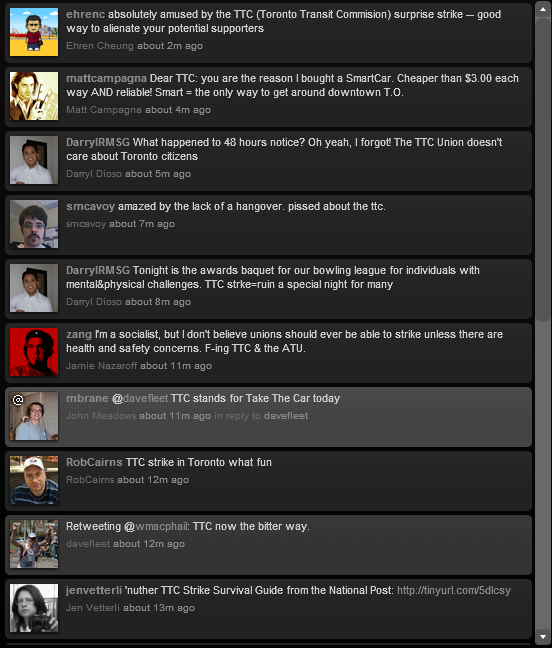
Update (8:50am): How has the public reacted? Let’s take a quick look at Twitter (via Tweetscan):

ttc-tweets

Can the union regain the public’s trust after this move?

(Photo credit: jbcurio)

Case Study: Using Social Media On A Small Scale To Raise Money For Charity

I’m a fanatical runner. I’m not particularly talented, but my dedication to my training enabled me to qualify for the 2008 Boston Marathon on April 21, 2008.

The Boston Marathon is the world’s oldest annual marathon and one of the world’s most prestigious road racing events. Besides the Olympic trials and the Olympic marathons, Boston is the only major American marathon that requires a qualifying time.

Exactly two months before the race I announced that I would use social media and the Boston Marathon to raise money for cancer research.

Objectives

Reaching the top of Heartbreak Hill in the Boston Marathon The objective for this was simple:

  • Raise $3,000 for the world-class Princess Margaret Hospital Foundation, based in Toronto (a somewhat arbitrary goal)
  • Raise awareness of my fundraising effort using social media, to see if these tactics would work for a promotional effort

Tactics

I threw my PR knowledge largely out the window for this effort. I’d decided up-front that I would use entirely online tactics to see how effective they could be.

The tools I chose to use:

When I announced the initiative, this blog had 278 subscribers. My running site had very few. I had around 500 Twitter followers (Twitterholic‘s stats only go back to March 1) and my Utterz account had just a few subscribers.

I wrote seven posts on my PR blog:

I wrote three posts on my running blog:

I also wrote dozens of Twitter messages over the two months, updating people on my progress and providing information on how to donate. Lastly, I recorded frequent posts through Utterz. The posts were a mix of video, audio, text and pictures about my training for the race. I posted all of the recordings to my running site – along with the route maps from my runs, these 31 posts formed the ongoing record of my training through this effort.

Results

Output

While my running blog continued to receive negligible traffic, several posts to my PR blog received more:

  • Using Social Media To Support Cancer Research – 643 views
  • Another Social Media Miracle? – 285 views
  • Auction – 217 views

Over these two months, this blog grew to over 500 subscribers. How much of that is due to this fundraising effort, I can’t say. I’m pretty sure it didn’t hurt, though. Meanwhile, my running blog subscribers remained relatively static, while my Twitter contacts grew to roughly 825.

My announcement of the fundraising effort also spawned a mini-fundraiser with Keith Burtis and Tommy Vallier, who generously volunteered their time and effort to set up an online auction to raise additional funds.

The effort generated some healthy interest on Twitter. Unfortunately, Twitter’s historical search is far from comprehensive, but you can see some recent posts here (for now).

Outcome

  • Raised $2,315 for Toronto’s Princess Margaret Hospital Foundation
  • I can trace 59% of the donations to people who only (or primarily) know me through my online presence
  • Oh, and I finished the marathon in 3:18:30


Success or Failure?

Looking strictly at the original objectives:

  • I failed to meet my original target of $3,000, but given that this was very arbitrary, I’m very happy with the money raised
  • Given the traffic to my site and the buzz generated on Twitter, I think the second objective was successfully achieved

This was a very small-scale effort, with zero budget and only occasional bursts of online activity. Was it a success? I’ll leave that to your judgement.

What do you think?

Deliciously Revealing Bookmarks

Del.icio.us is an awesome tool, plain and simple. It lets you easily access your bookmarks from any computer, take advantage of other peoples’ reading and even track topics over time. I’ve written before about six great ways to make your life easier with del.icio.us.

Today, though, I’m warning you to be careful what you bookmark. Your bookmarks can reveal a lot about you.

You should already know that pretty much everything you do online leaves a footprint that can reflect on you for years to come. Your bookmarks are no different.

The sites you save can reveal a pattern.

I can tell you, for example, that one of my contacts recently saved a lot of links to sites about photo collages. Another got very interested in social media measurement recently. Another is into fantasy baseball.

That’s pretty harmless stuff. I’m sure they don’t mind that I know that, just as I don’t mind that they know (from my del.icio.us bookmarks) that I checked out GroupTweet yesterday and a post on American Airlines’ crisis blog the day before.

Be careful with your links

del.icio.us has a 'do not share' optionWhat about more private stuff?

How about the person that got very interested in a particular company all of a sudden?

Did it signal an upcoming career change? Personally I wouldn’t want my boss seeing that. Perhaps they’re for an upcoming pitch for new business? Nice way to inform competitors that the company may be looking.

Here’s a tip: Del.icio.us has a “do not share” option. If you’re saving links that you’d rather other people not see, use it. Your link will then just be saved for you, away from prying eyes.

This doesn’t change the fact that del.icio.us is an extremely useful tool. It is still at its most powerful when you share links with others.

However, this serves as a reminder to be careful with everything you do online. That includes bookmarks.

Twitter To Finally Find A Business Model?

Twitter logoIs Twitter close to finally introducing something resembling a business model?

The blogosphere is buzzing today with talk of Twitter adding ads to its posts.

Rumour has it that Twitter will be introducing ads into peoples’ Twitter streams. This would mean that after every 10, or 20, or however many posts, users would see an ad in their Twitter stream. Regular users would have noticed a fair bit of downtime last night. Some people reported seeing ads in their Twitter stream during those outages.

This approach makes sense.

Many Twitter users don’t use the Twitter website itself. Instead, they use third-party applications like Twhirl, Twitterrific, GTalk or Twiku to post their messages. On-site ads would miss these users, but by including ads in the flow of Twitter posts, the company captures a much larger audience.

While the majority of people seem ok with the idea, some people are vehemently opposed, say they’ll quit the site if this happens.

Me? I’m just surprised it took this long. Despite the last round of funding bringing in $5.7m in July 2007, Twitter hasn’t raised a dime in revenue so far.

Twitter needs a business model. With what must be huge server, bandwidth and development costs, it can’t go on providing a free, non-commercial service. Either they introduce a more feature-rich service that people would pay for (and undermine one of Twitter’s biggest attractions – simplicity) or they turn to ads.

The obvious solution, and one that people seem to have figured out, is to include ads but provide an option to turn ads off. This would likely take the form of a (paid) premium service. If it’s affordable, I think hardcore users are likely to take advantage of something like this, while more casual, occasional users would probably deal with the ads.

Do you think this is the right way for Twitter to go?

Update: Oops. This then, again, raises the question: When the hell will they start raising revenue, and how?

Twitter Clouds – What Do You Write About?

What do you write about?

Tweet Clouds, an created by John Krutsch and Jared Stein, lets you answer that question.

The tool creates a “tag cloud” – a visual representation of what you write about – for your Twitter posts. More common words are displayed in a larger font, so it’s easy to see your popular topics (or someone else’s).

Tweet Clouds allows you to include two-word phrases, which is a nice touch and adds a bit of context (“social media” appears a lot in my cloud, for example). For a little extra spice, Tweet Clouds also lets you add your del.icio.us bookmarks, so it shows you both what you write about and what you’re interested in- a nice touch.

Tweet Cloud - Dave Fleet

How is this useful?

I know that a few of my Twitter friends have been a little disturbed recently by “creepy” people they don’t know following them on Twitter. This provides a neat way to find out what those “creepy” people write about before defaulting to the “block” button. I’d love to see something like this accessible from peoples’ Twitter pages – it would make the decision of whether to follow them much easier.

For me, it’s cute but I’m not sure of any other uses. Perhaps if you could plug other sites into it and get a picture of your overall social media presence…

What do you think? Do you see any other uses for Tweet Clouds or is this just another neat tool that you look at once then never use again?

American Airlines’ Reputation Crisis

American Airlines has received a lot of negative attention recently.

In January a snowstorm in Chicago caused the cancellation of numerous flights. This week the airline cancelled over 3,000 flights (more than 600 today alone) to conduct wiring checks on the planes, stranding more than a quarter of a million passengers.

aa_adTo add to the airline’s misery, its pilots union went on the offensive as the Allied Pilots’ Association took out a big ad in USA Today to attack the airline’s management. The ad links to a new site called Tell Your AA Story, which claims to be “produced by a group of concerned American Airlines employees.”

The site encourages passengers and employees alike to share their stories of dissatisfaction with the union and with American Airlines management, although it warns:

Note: your message will be sent to AA management, but we cannot guarantee that they will read, much less respond, to your concerns.

Double trouble. The airline is facing a major reputation crisis.

American Airlines’ Response

So what is American Airlines doing to address the situation?

Offline Response

According to PR Week, the company has mobilized its entire communications team (a whopping seven people) and prioritized “direct engagement with passengers on the ground.” In addition:

AA held multiple press conferences for reporters, one of which included a b-roll of an inspection of an American Airline plane, as well as photos demonstrating the wiring in question.

So far, so good. Helping reporters to understand what’s going on is a good idea.

[American Airlines' VP of corporate communications Roger] Frizzell acknowledged, however, that the person waiting in the airport doesn’t care why the planes were grounded, just that his or her life was disrupted, so the company needed to address that in its communications.

Again, good. They understand that excuses won’t cut it. Another note in the story, though, made me raise my eyebrows.

Frizzell told PR Week that American “passed out press releases to consumers waiting in the airport to keep them informed.”

Wait, what? That’s your idea of direct engagement?

Ok, to be honest I’m not sure American could have come out on top in terms of the passengers at the airport. I’m not convinced that handing out press kits is the way to go though, especially when the releases don’t fit the messaging that your VP of communications is using:

These inspections were necessary to ensure compliance with a Federal Aviation Administration directive related to the bundling of wires in the wheel well of the MD-80 aircraft.

Online Response

The company’s website doesn’t put the best face on the situation, either.

There is a (understated) message at the top of the American Airlines homepage: “Aircraft Inspections Affect Some AA Travel.” The content of the next page, though, does very little to convey any sense of caring about its customers. Apart from a perfunctory message at the top, the rest of the page is very functional and to-the-point. “Sanitized” is the word I’d use. The page shows customers how to get a re-fund, how to re-book and how to get to the company’s press releases.

Say what you will about how JetBlue handled its crisis last year, it did provide a somewhat personal response through a video message by its CEO David Neeleman. It wasn’t the best response in terms of the execution or timing, but the right idea was there.

American Airlines, on the other hand, has done little in this area. It wasn’t until yesterday that CEO Gerard Arpey apologized for the debacle – three days after it started. Even then, as others have pointed out, he didn’t apologize for the inconvenience to customers, just for his failure to ensure safety standards are met. What’s more, his apology doesn’t appear anywhere on the American Airlines website.

Overall, their online reaction gets a failing grade from my perspective.

Conclusion

American Airlines is in a tough position. This isn’t a crisis that communications alone can solve. Also, to be fair, they’ve done several things right:

  • Focusing on the customers on the ground
  • Multiple press conferences
  • Educating reporters about the situation
  • Keeping people up-to-date with what’s happening.

However, there are a lot of things they could do better:

  • Find a more personal, less sanitized way of keeping people on the ground informed
  • Make sure everyone is singing the same tune
  • Make the website about the people, not just the process
  • Get out there sooner
  • Have the CEO apologize for what matters to customers
  • Put the CEO’s apology up on the website.

What do you think? How could American Airlines have communicated better in this crisis?

Four Different Uses For Four Different Networks

How do you use the different social networks you’re part of? Do you use them all in the same way?

I got to thinking today about how I use relatively similar services in very different ways. Take social networks, for example. I’m a member of a bunch of them. I don’t have time to use them all to their full potential so I play to the strengths of each of them.

Twitter – Building Relationships and Knowledge

Twitter Twitter has become my number one tool for developing new relationships with people online. The level of interactivity that Twitter offers, the multiple ways to use the service (through a browser, through a third-party service, via instant messenger) and the asynchronicity it allows make it my preferred service for this function.

At the same time, the open nature of most conversations on Twitter also makes it ideal for learning. If I’m unsure about something, I throw out a question and 90% of the time I get several answers within a couple of minutes.

Utterz – An Intermediary

Utterz I’ve written about Utterz a few times recently, as I’ve started to use the tool more and more. I worked out how to publish to multiple Utterz accounts from one phone, and just the other day I explored the Utterz’s new site for mobile phones.

I’ve found that I use Utterz primarily as an intermediary. I do very little communicating in the service itself. Instead, I use my two accounts (PR and running-focused) to record audio and video messages and publish those to my blogs and other networks.

LinkedIn – Investing for the Future

LinkedIn LinkedIn is like Utterz in a way, in that I do relatively little communicating on the site itself.

I use LinkedIn primarily to firm-up contacts I have with others. It’s my most formal social network – I maintain a network there that’s focused around business, rather than the more casual relationships I have on other sites. As Colin Carmichael wrote today, it’s part fancy business card and part fancy rolodex. It’s there for a future day, when I need to draw on my professional network.

Facebook – An Aggregator

Facebook The way I use Facebook has changed over time.

When I first signed up I used it as a way to re-connect with people, to stay in touch and to post cool stuff. Since then, I’ve started to use it less and less. Nowadays, while I still tune in for the occasional game of Scrabulous, I use Facebook as a funnel for my other services. Blog posts, Utterz posts, del.icio.us bookmarks and Twitter messages all get pumped into that account.

Why? Because it’s become one of the casualties as I spend more time on other services. Plus, I’ve found Facebook’s usefulness has become diluted over the last few months.

What About You?

Which social networks are do you use? Do you use them for different things? How do you use the social networks you’re on?

Expand Your Twitter Network With Two New Services

Finding interesting people to follow is one of the biggest challenges for new Twitter users. It really helps to have people there whenever you log on, to answer questions, solve problems and generally communicate with. Without a community to participate in, posting to Twitter can be like a tree falling in a forest.

Two tools came to my attention recently that aim to help people with this problem.

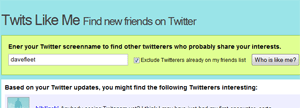
Twits Like Me

Twits Like MeTwits Like Me looks at your ‘tweets’ and finds other people who write about the same things as you.

The service was created by Mahalo software engineer Chris Finke.

It’s been around for almost a year but flew under my radar until today.

Twubble

Twubble Twubble takes another approach. It looks at who your friends follow (your “friend graph” as it calls it) and suggests new people based on how many follow each of them.

Twubble was created by Bob Lee, a software engineer at Google, who works on the Android project.

Which Works Better?

Personally I’ve found that Twubble has thrown up more relevant results so far. However, that could be attributable to the fact that my Twitter messages have been pretty eclectic over the last day or two, and not focused on particular topics.

In general, I suspect that the tool you prefer (if you use either) will come down to personal preference and how you like to use Twitter. Are you looking to make connections within a particular network, or to meet people with similar interests? Of course, these worlds may overlap but in my mind this helps to differentiate the tools.

Which of these services do you prefer? Do you find them useful at all?

You can connect with me on Twitter here.

Website Grader: One-Stop Search Engine Optimization Analysis

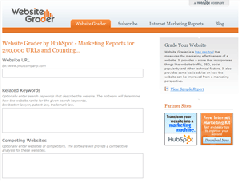
Website Grader is a free search engine optimization tool that measures the marketing effectiveness of your website.

Provided by Hubspot, the service looks at over 50 factors and provides you with a score that ranks your site alongside all of the other sites it has assessed.

Website GraderJust input your website’s address and (optionally) a few keywords for your site and/or competitors’ web addresses, and the site spits churns out a report packed with useful tips for improving the marketing of your site.

Analyzing Your Site

Website Grader looks at six broad areas:

  1. On-page SEO - metadata, keywords, images, readability, interior pages
  2. Off-page SEO – inbound links, Google PageRank, domain info, traffic, relevant directory services, indexed pages
  3. Blogosphere - whether you have a blog, how it ranks on Technorati, recent blog posts
  4. Social Mediasphere - limited to del.icio.us and digg
  5. Converting visitors to leads - do you have an RSS feed and conversion form?
  6. Competitive intelligence - how well you rank and how you shape up compared to your competitors

How This Site Measures Up

I ran the report twice, three weeks apart, to compare the results. I was pleased to see that my score rose from 85% to 92% over that time, meaning this site ranks higher than 92% of the sites Website Grader has looked at.

I still have a bit of work to do:

  • I need to insert meta keywords into my template
  • I need to remember to use alt tags on all my images
  • My domain name registration will expire in six months; renewing it would be a good idea
  • My Google PageRank could use a boot up the rear end
  • The site isn’t listed on any third-party directories.

Conclusion

Website Grader is a very useful tool. It’s not comprehensive by any means (the social media section in particular is far from complete) but it provides an excellent top-level analysis of your site that, combined with other tools, can help you to improve your site’s visibility.

Of course, none of this is any use if you don’t provide good content for your visitors.

How does your site measure up? What could you tweak to make your content more visible?